Saturday, March 23, 2013

Mini ADSL + 3g wireless router


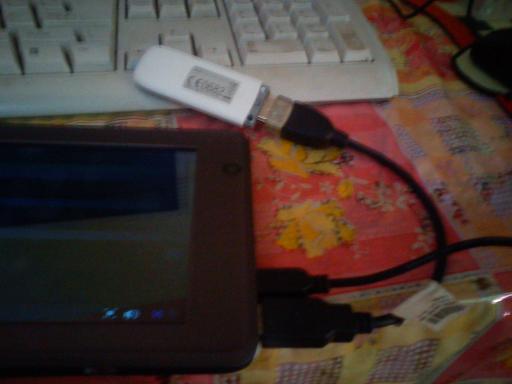
Mini ADSL + 3g wireless router supports USB wireless dongle with inbuilt rj45 port and Battery

How do you share your internet connection with wifi connection to your tablet/phone or laptop. This is the best way to try for that.
This Router supports for 3G internet dongles.Also you can use 3g connection with your laptops and tablets with wifi connection.
You can use the RJ45 connector as a wan or lan port. Also you can conncet to you r SDSL router with RJ45 conncetor can use as a hotsopt.
 Also you can plug the power by usb port or AC/DC charger. It also supports for IEEE802.3X,IEEE802.11b/g/n. speed is Up to 54 Mbps. over 150m. Inferfaces are Micro USB(for DC In)       Ethernet port (Wlan/Lan), Reset button.


Quick Details

  • Type: Wireless
  • Application: Soho
  • Function: Firewall
  • WAN Ports: 1
  • Brand Name: Newsky
  • Model Number: DM8636R-B
  • Place of Origin: Guangdong, China (Mainland)
  • size: 61.5*61.5*21(mm)
  • Wireless Speed: Up to 150 Mbps
  • Color: Blue, White,Pink or Yellow...
  • Ethernet: 1*port
  • battery: 1800MHA
  • adsl: support
  • wifi repeater: support
  • wifi bridge: support
  • usb modem /dongle: support
  • PPPOE dial up: support


Specifications

  1. Inbuilt Battery 3g wireless router support usb wireless dongle
    2.1 Ethernet port (Wlan/Lan)
Feature
Super portable wireless router, as high as 150Mbps
Supports power supply and USB charge
Automatic receipt of IP address with DHCP Server
Supports Virtual Server, Special Application and DMZ host
Provides 64/128-bit WEP encryption security, Supports WPA-PSK/WPA2-PSK
Built-in Firewall, DoS protection function, support WEB management
Automatic 3G/WAN failover
Supports firmware upgrade and remote Web management


Specifications
Standards--IEEE802.3,IEEE802.3U,IEEE802.11b/g/n
Wireless Frequency--2.4G-2.4835GHz
Wireless Speed--Up to 150 Mbps
IP Filtering, Domain Name Filtering, MAC Address Filtering
Interface--1*Micro USB(for DC In)
1*Ethernet port(Wlan /Lan)
1*USB 2.0 for connecting 3G USB modem
1* 3G/WAN switch button
1* Reset button


Internet connection--        Support 3G, PPPoE(DSL and Cable modem), dynamic IP, static IP broadband access
                                          Support Auto Dial, on-Demand Dial,Regular Dial requirements
Wireless Security--           64-bit/128-bit WEP,WPA-PSK/WPA2-PSK
Device Size--                     61.5×61.5×21(mm)
Installation Environment--       Temp.:0~40oC, humidity:10%~90%RH, non-condensing


Accessories
1 x wireless router
1 x charger
1 x Quick Start Guide

Mini cnc router with wifi roaming


How do you share your internet connection with wifi connection to your tablet/phone or laptop. This is the best way to try for that.
You can use the RJ45 connector as a wan or lan port. Also you can conncet to you r SDSL router with RJ45 conncetor can use as a hotsopt.
 Also you can plug the power by usb port or AC/DC charger. It also supports for IEEE802.3X,IEEE802.11b/g/n. speed is Up to 54 Mbps. over 150m. Inferfaces are Micro USB(for DC In)       Ethernet port (Wlan/Lan), Reset button.

Quick Details

  • Type: Wireless
  • Application: Soho
  • Function: Firewall
  • WAN Ports: 1
  • Brand Name: Newsky
  • Model Number: WAP812
  • Place of Origin: Guangdong, China (Mainland)
  • color: Pink/Green
  • Battery: No
  • Wireless Speed: 54 Mbps
  • wifi: IEEE802.11b/g/n
  • Wifi roaming: support
  • Functions: software modify Wi-Fi SSID, Channel and Pass code
  • usb charge: support
  • OS: Windows 2000,XP, XP64, 7, Vista, Visita64
  • Accessory: 1 x wireless AP/ 1 x USB Cable/1 x Quick Start Guide

Packaging & Delivery

Specifications

1.mini cnc router , wireless 802.11n ap router
2.1 Ethernet port(Wlan/Lan)
3.Support ADSL
4.Support wifi roaming

Feature
 1, Super portable wireless AP with MIMO, as high as 54Mbps
 2, Supports power supply and usb charge.
 3, supports IEEE802.3X, and flow control of high speed data transmission
 4, Supports software modify Wifi SSID, Channel and Pass code functions.
 5, Supports Wifi roaming, achieve efficient wireless connections
 6, Supports Windows 2000,XP, XP64, 7, Vista, Visita64 OS
Specifications
 Standards , IEEE802.3X,IEEE802.11b/g/n
Wireless Speed , Up to 54 Mbps
 Interface
           1*Micro USB(for DC In)
           1*Ethernet port(Wlan/Lan)
           1* Reset button

Internet connection
1) Support software modify wireless SSID, Channel and Pass code

2) Support wifi roaming, achieve efficient wireless connection.

 Wireless Security
 IEEE802.3x, and flow control of high speed data transmission
 Device Size
 57×57×18(mm)

 Installation Environment 
Temp, 0~40oC,     humidity, 10%~90%RH, non-condensing

 Accessory
             1 x wireless AP
             1 x USB Cable
             1 x Quick Start Guide

Tuesday, March 12, 2013

Clean up Winsxs folder

You have to face free space problem in C: drive (system drive) with windows vista/win 7 and 8.
We can use these steps to reduce unwanted files in your hard disk. 
 
Mode 1

The first thing you can do is reduce the size of the backup folder by running the following

command (Start, type CMD):


dism /online /cleanup-image /spsuperseded /hidesp

After a bit of research I managed to use the command below and reduced the winsxs by 4G


DISM /online /Cleanup-Image /SpSuperseded


There is also another way to remove the backup files for SP1 in Windows 7 and make it

permanent. Simply open up the Disk Cleanup utility, click on Clean Up System Files and then

check the Service Pack Backup Files box
.

Mode2

You can start the Disk Cleanup tool by running Cleanmgr.exe, or by clicking Start, pointing to Programs, pointing to Accessories, pointing to System Tools, and then clicking Disk Cleanup. Disk Cleanup supports the following command-line switches: 

For example, in Scheduled Tasks, you could run the following command after running the cleanmgr /sageset:11 command:
 
cleanmgr /sagerun:1

This command runs Disk Cleanup with the options that were specified with the cleanmgr /sageset:11 command.
The available options for Disk Cleanup that you can specify by using the /sageset and /sagerun switches 


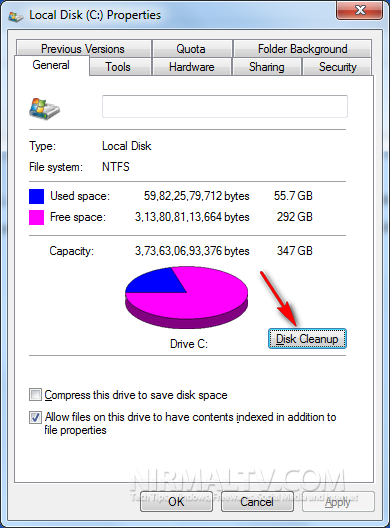
Now You can open the my computer and right click on the drive and select properties .select disk clean up or 

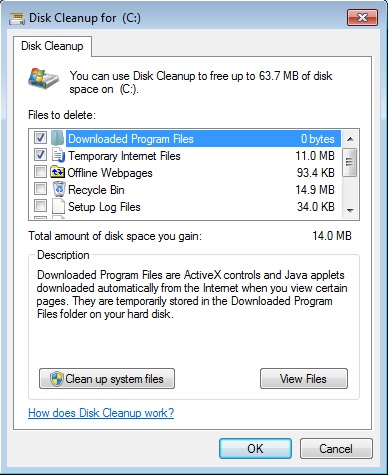
STEP 1. Click the Start button-All Programs-Accessories-System Tools-and then click Disk Cleanup.
 
 STEP 2. Select the disk by clicking Drives list arrow and then click OK.

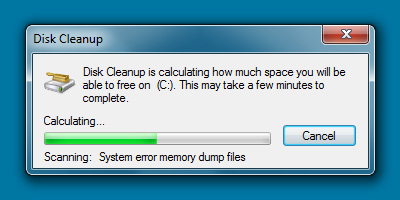
STEP 3. Wait while Disk Cleanup observe how much space it can free up.


STEP 4. Select the check boxes for the folders and files you want to delete.

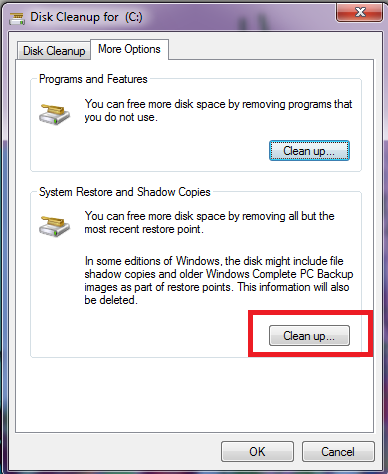
To Clean up more go to more options tab in disk clean up and select clean up button in system  restore and shadow copy. 


Sunday, March 10, 2013

How Access mobile 3G line with PC/Tablet/Laptop (sharing Internet)


How Access mobile 3G line with PC/Tablet/Laptop (sharing Internet)
You can use your mobile 3G/4G internet line with PC or laptop using USB Data cable / Bluetooth / Wifi connection by Easy way.

1.       You need android mobile phone or android Tablet pc , no need to Root.
2.       You need configure Internet with 2G(Gprs) or 3G Hspa with your mobile connection.
3.       If you have tablet pc with 2G/3G feature or not 3G/2G it’s ok.

4.       You can use 3G dongle and connect with USB port and configuring Internet.
5.       You have to download android application pdanet.app and if you using Desktop pc or laptop using windows O/S you have to get PdaNetA4013.exe
6.       If you install pdanet.app in your phone or tab first you may appear download windows version software to your phone. You can download it to your SD card and connect to pc and install it to pc.
7.        If you install PdaNetA4013.exe in your PC first you may appear install app version software for your phone. You can select and install it automatically to phone or tab.

8.       Pls check android O/s version for compatibility for application. My xperia x8 Android 2.1 wasn’t work (2.03).But My 7” tablet pc 4.0 ICS worked well.
9.       You have to enable Debugging mode in your phone or tablet. Enable usb debugging (settings->applications-development
10.   To install PdaNet to pc run PdaNet exe and following instructions. After installation run
11.   Pls open PdaNet and enable USB Teathering for USB cable or enable blue tooth DUN to connect with blue tooth connection and connect the phone cable to your pc or laptop.

12.   Open Start Menu\Programs\PdaNet for Android\Install Legacy Network driver to install pda network.
13.   Click on the pdanet icon on the taskbar and click connect internet USB for USB cable connection.
14.   You have to enable settings for blue tooth /USB / Wifi and test connection with 3g network as your connection.

15.   You can search blue tooth and wifi devices by your client device (as the same way you using to connect devices) to connecting with blue tooth or wifi for using internet.
16.   To connecting internet with Bluetooth connection to pc or tablet you have to click pdanet icon on taskbar and select settings and select Bluetooth pairing. And search and select Bluetooth connection.

17.   Your device and android Os version must be compatible with Wifi connections for enabling wifi teathering.
18.   After add the network you can open browser and set automatically settings for connecting (no proxy or ip)
19.   Open browser and go internet.
20.   Good luck.


Friday, March 8, 2013

Astro-Vision Lifesign 12.5

Astro-Vision Lifesign 12.5

The Flagship Astrology Software Product

Support Languages: English, Hindi, Tamil, Malayalam, Telugu , Kannada and Sinhala

 Astro-Vision is a pioneer in astrology software development and its flagship software, Astro-Vision Lifesign 12.5 is used by over 10,000 satisfied customers. Our users include astrology centres, business centres, Internet cafes, STD /PCO booths, Xerox centres, Marriage bureaus, astrology classes, and astrologers around the world. Our astrology software enables our clients to offer computerised astrology services commercially.

 Astro-Vision Lifesign 12.5 offers accurate and complete horoscope calculations and predictions. Our astrology software is based on the Indian system of predictive astrology.

 Astro-Vision Lifesign 12.5 gives you the option to customise the Horoscope reports as required; e.g., as a single-page horoscope report, horoscope report with charts and calculations only, horoscope report with detailed predictions, etc. You can even choose from the templates available in Astro-Vision Lifesign 12.5. This will help you deliver different types of horoscope reports at various prices to your customers. The typical rates range from INR 750 to INR 10 depending on the type of report. 

 Astro-Vision Software Lifesign 12.5 is available in multiple languages - English, Hindi, Tamil, Malayalam, Telugu and Kannada. So you can provide astrology services to clients across India. This feature also makes it one of the most sought after Hindu astrology software.

Astro-Vision LifeSign 12.5 also provides you a choice of chart formats, like, North Indian, South Indian, Bengali, Kerala and Sri Lankan chart styles. This means you can generate horoscope reports from Astro-Vision Software according to the individual requirement of your customers.

 Prepare horoscope reports and save it to a CD, Floppy, Hard disk or simply take a print out. You can also send this report to customers through mail, so they can view and take a printout of the report at their convenience. This increases your scope and area of operations. 

The user interface is simple and intuitive. You don�t require any prior knowledge of Vedic Astrology to be able to use Astro-Vision Software. 

 Astro-Vision provides prompt after-sales support through Email and telephone. Our extensive network of Branches, Dealers and Distributors also provide support for the various Astro-Vision astrology software products. 

 Do you wish to ordering or need more information and sample reports ,pls inform us.

un official support by : sonicpcmat@yahoo.com 

Also we can ordring and supporting for you to buy this software .